

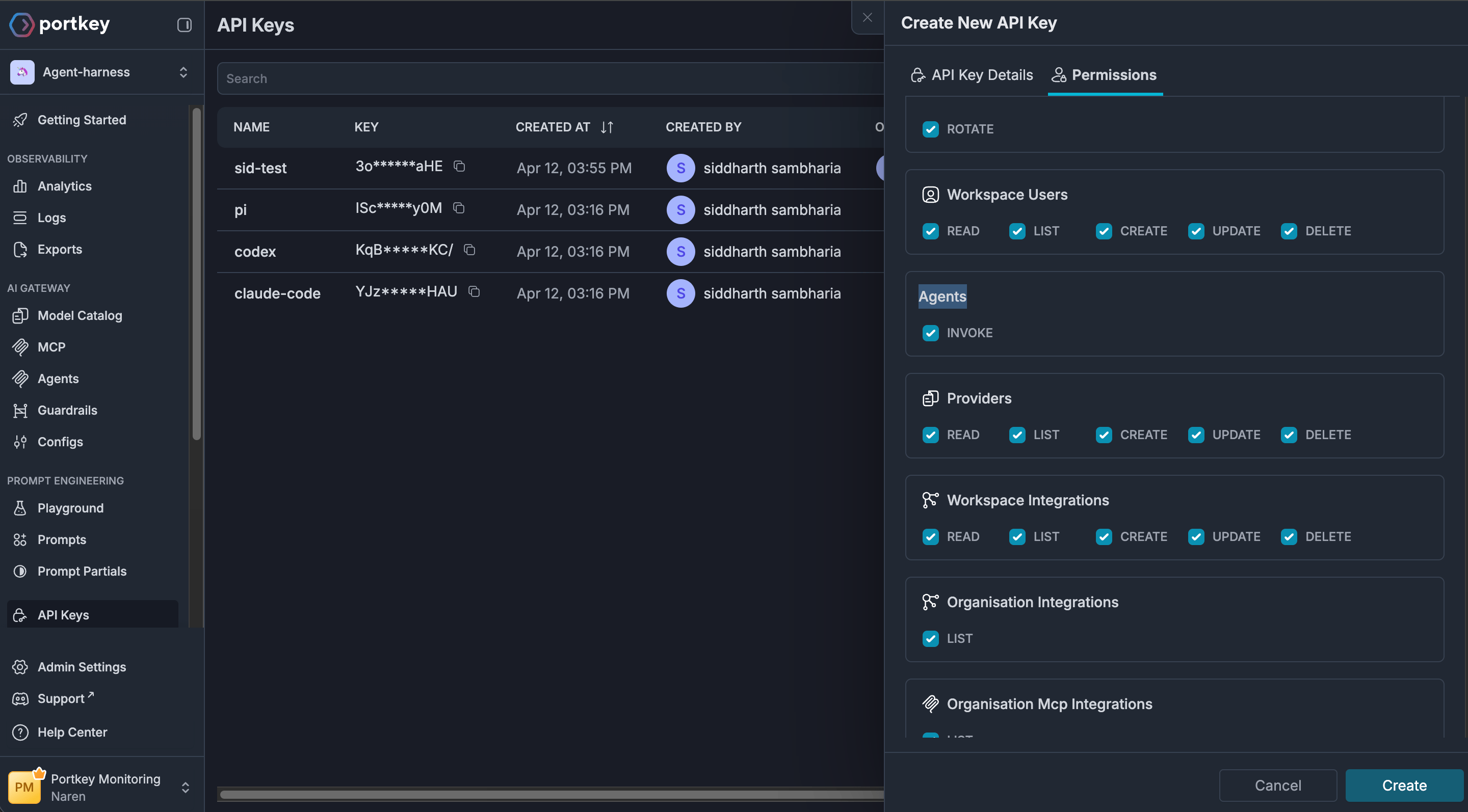
Modify the API key permissions and turn on the toggle for Agent Gateway to enable Agent Gateway for your API key. Create or edit a key on the API Keys page, and enable the agents.invoke scope when you will invoke agents with that key. For how Portkey API keys and scopes work, see API keys, authentication, and authorization.
All you need to get started is an agent server. For this quickstart, we will be using an A2A agent.
1

Fetch your server URL

Make use of one of the following agent servers and configure it as the upstream agent server. This is used to fetch the agent card and authenticate requests.

Hello world A2A Agent

Simple A2A Agent with tools and header based authentication

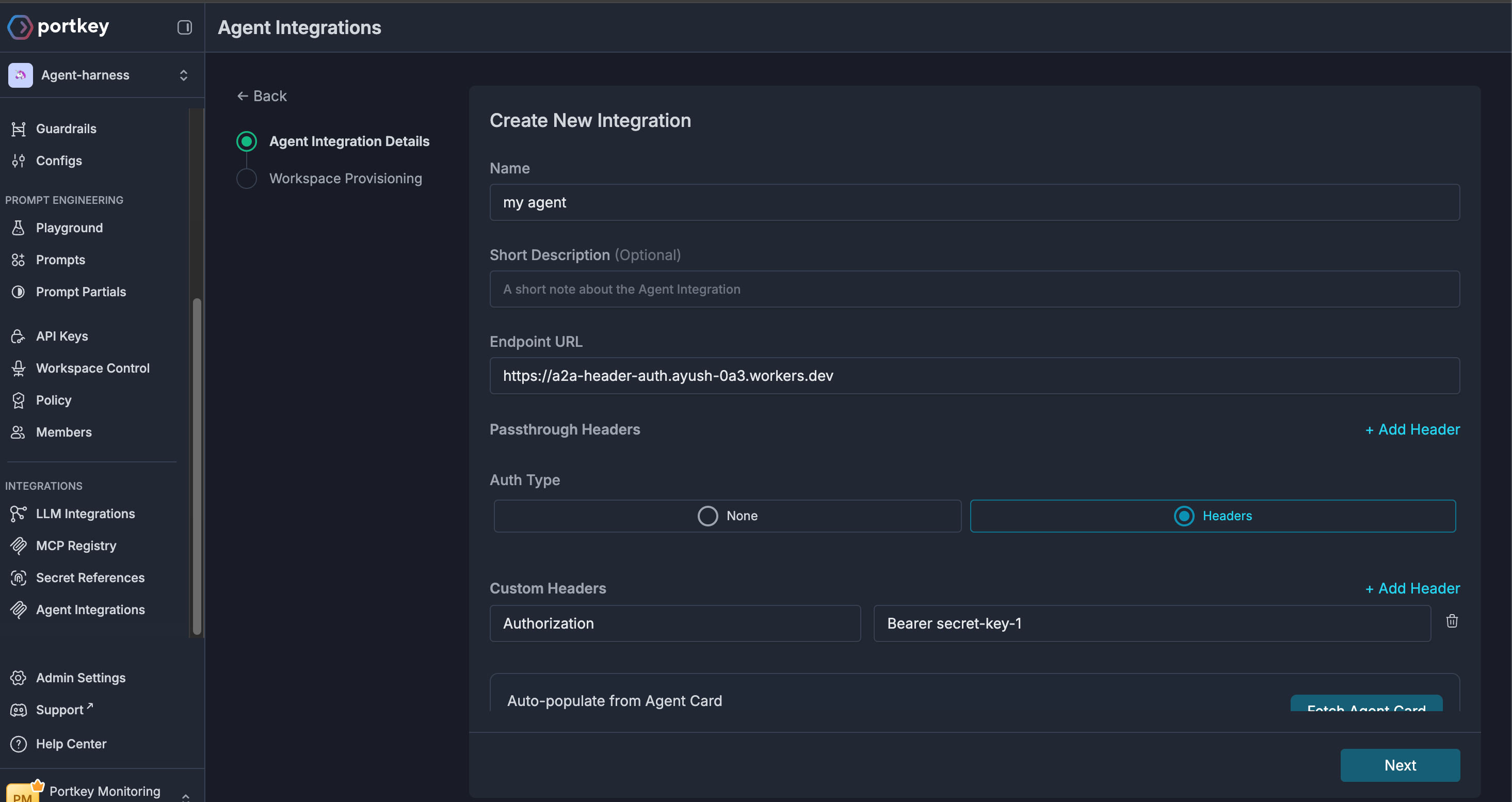
https://a2a-header-auth.ayush-0a3.workers.devheaders: Authorization: Bearer secret-key-1

Host your own agent

You can host your own A2A Agent server following the instructions in the Agent Server SDK documentation.
2

Add agent to registry

1

Configure the agent

Access the Agent Registry and configure the agent server URL.
2

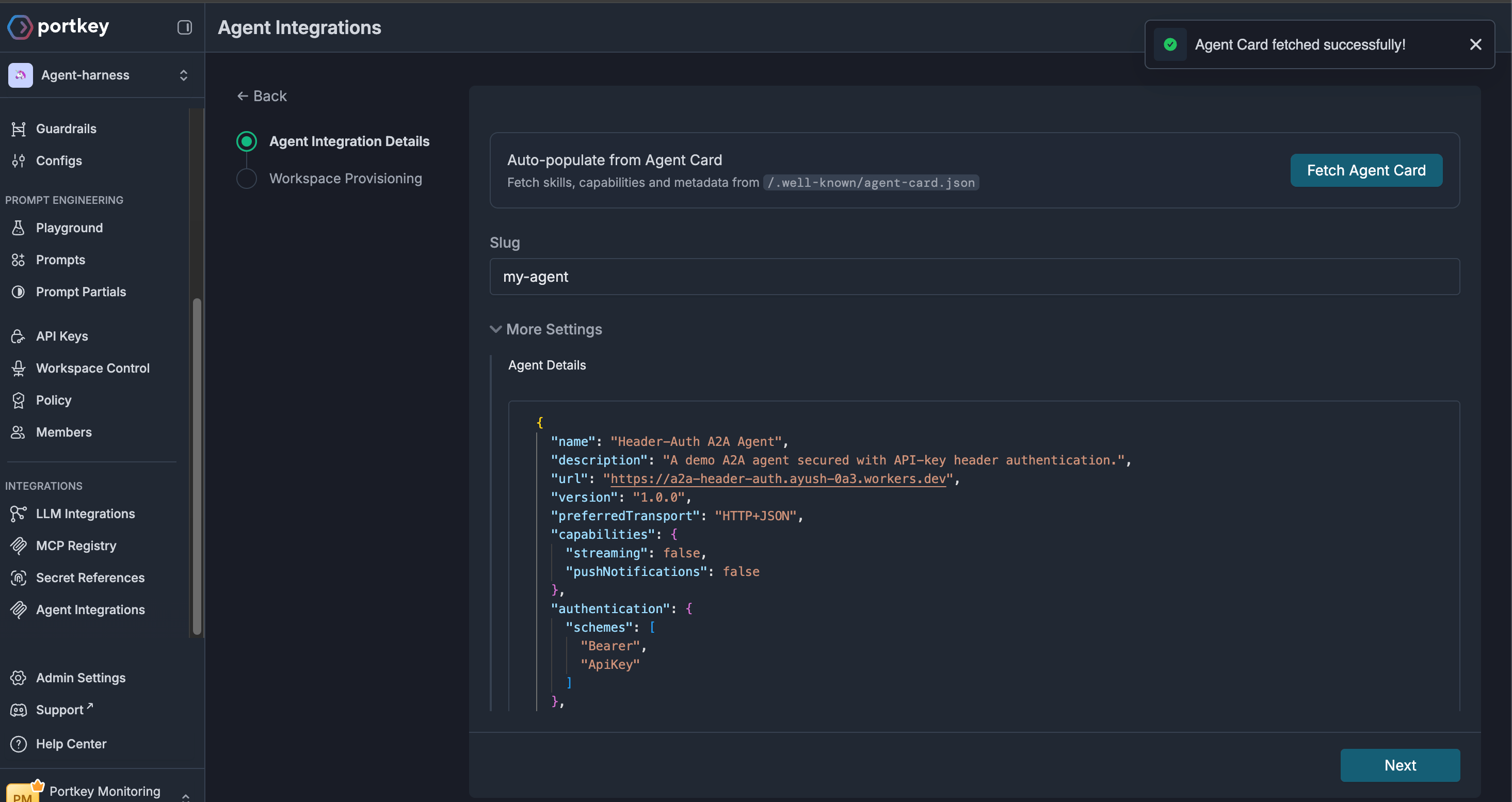
Fetch agent card and validate

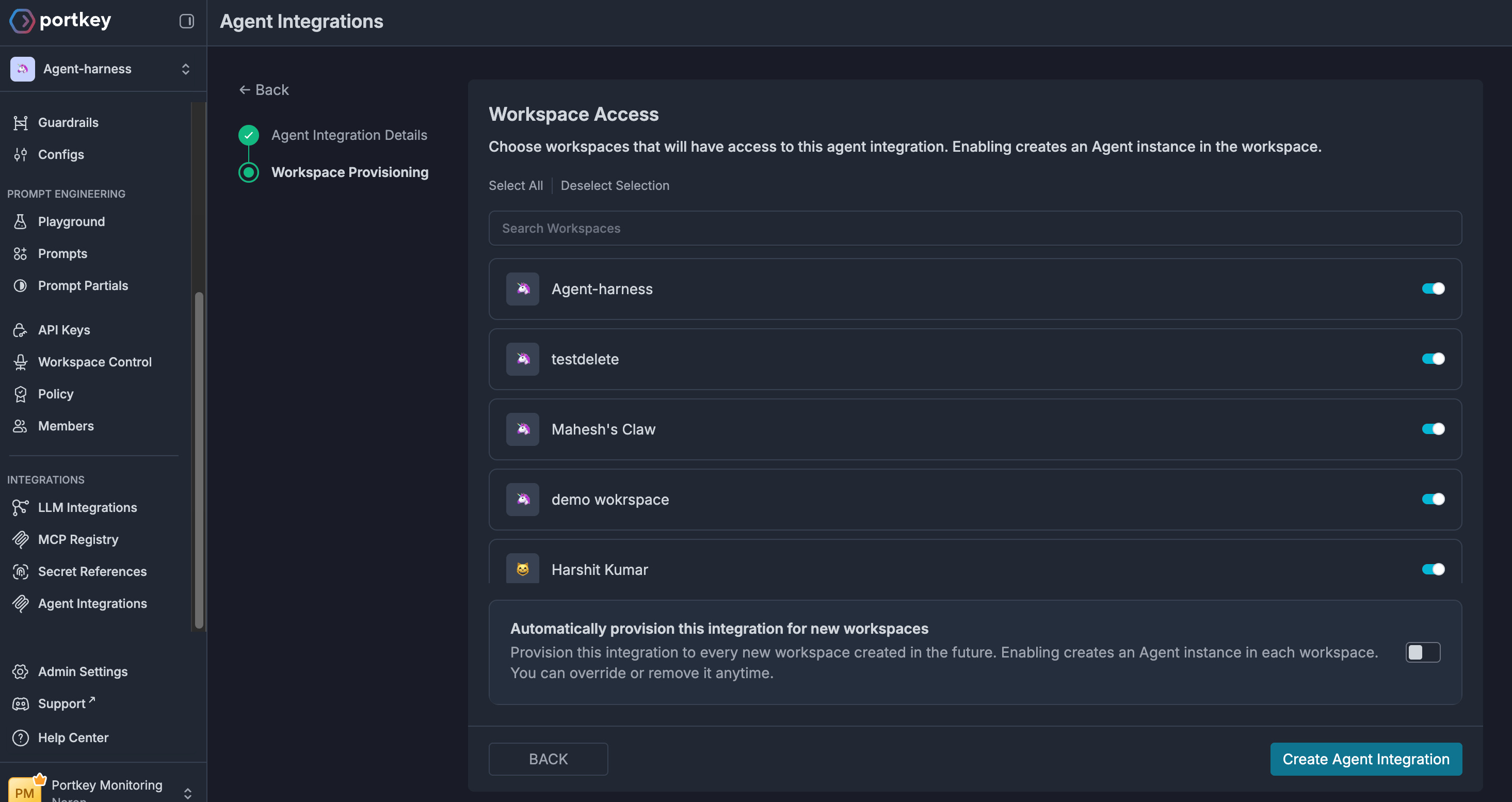
Validate transport and authentication schemes by clicking the Fetch Agent Card button. The upstream URL must be a public http/https endpoint (Backend v1.16.1+ applies SSRF protections and rejects private IPs, metadata hosts, and URLs with # fragments).
3

Provision workspaces

3

Verify your integration

1

Grab your Portkey API key

Head over to the API Keys page and create a new API key. Make sure the agents.invoke scope is enabled for your API key.
2

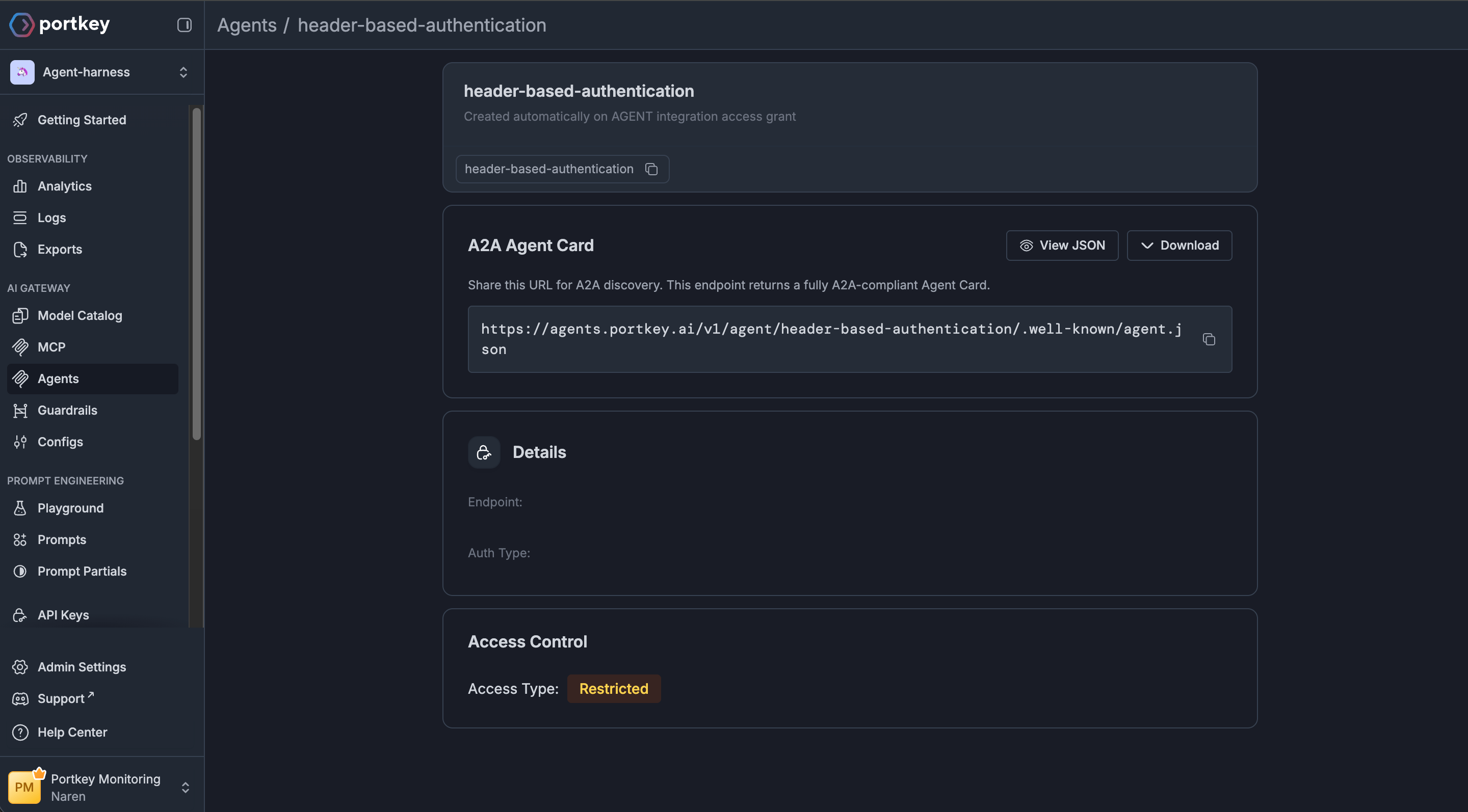
Fetch the agent server URL from the agents tab

Open the Agents tab and fetch the corresponding agent server URL. This is the URL you will use to connect your agent to the Portkey Agent Gateway instead of the agent server URL. It looks something like this (you can replace the agent slug with your server’s slug): https://agents.portkey.ai/v1/agent/header-based-authentication
Interface with your agent

You can simply replace your agent server URL with the one you fetched from the agents tab and test out the integration. Alternatively, make use of one of the code snippets below!
curl --location --request POST 'https://agents.portkey.ai/v1/agent/{agent-slug}/.well-known/agent.json' \
--header 'Content-Type: application/json' \
--header 'x-portkey-api-key: {PORTKEY_API_KEY}'
import asyncio
import json

from a2a.client import A2ACardResolver
import httpx

BASE_URL = "https://agents.portkey.ai/v1/agent/{agent-slug}"
API_KEY = "{PORTKEY_API_KEY}"


async def log_httpx_request(request: httpx.Request) -> None:
    try:
        body = request.content.decode("utf-8") if request.content else "<empty>"
    except Exception:
        body = "<streaming or unreadable body>"
    print(f"[httpx] {request.method} {request.url}")
    print(f"[httpx] body: {body}\n")


async def main() -> None:
    print(f"Fetching agent card from {BASE_URL}...")
    async with httpx.AsyncClient(
        base_url=BASE_URL,
        headers={"x-portkey-api-key": API_KEY},
        event_hooks={"request": [log_httpx_request]},
    ) as client:
        resolver = A2ACardResolver(httpx_client=client, base_url=BASE_URL)
        agent_card = await resolver.get_agent_card()
        print(json.dumps(agent_card.model_dump(mode="json", exclude_none=True), indent=2))


if __name__ == "__main__":
    asyncio.run(main())
import {
  DefaultAgentCardResolver,
  ClientFactory,
  ClientFactoryOptions,
} from "@a2a-js/sdk/client";

const BASE_URL = "https://agents.portkey.ai/v1/agent/{agent-slug}";
const API_KEY = "{PORTKEY_API_KEY}";

class HeaderAuthInterceptor {
  async before(args) {
    args.options = {
      ...args.options,
      serviceParameters: {
        ...(args.options?.serviceParameters || {}),
        "x-portkey-api-key": API_KEY,
      },
    };
  }

  async after() {}
}

function createAuthenticatedFetch() {
  return async (input, init = {}) => {
    const headers = new Headers(init.headers || {});
    headers.set("x-portkey-api-key", API_KEY);
    return fetch(input, { ...init, headers });
  };
}

async function main() {
  console.log(`Fetching agent card from ${BASE_URL}...`);

  const authFetch = createAuthenticatedFetch();
  const resolverBaseUrl = BASE_URL.endsWith("/") ? BASE_URL : `${BASE_URL}/`;

  const options = ClientFactoryOptions.createFrom(
    ClientFactoryOptions.default,
    {
      cardResolver: new DefaultAgentCardResolver({
        fetchImpl: authFetch,
      }),
      clientConfig: { interceptors: [new HeaderAuthInterceptor()] },
    },
  );

  const factory = new ClientFactory(options);
  const client = await factory.createFromUrl(resolverBaseUrl);

  const card = client.agentCard;

  if (!card) {
    throw new Error("Unable to read agent card from SDK client instance.");
  }

  console.log(JSON.stringify(card, null, 2));
}

main().catch((error) => {
  console.error(error);
  process.exit(1);
});

Further reading

Agent Registry

Manage your agent integrations and control access to agents and their skills.

Agent Servers

Learn how virtual agent servers work and how to host your own.

Advanced code snippets and examples

Explore additional examples for fetching agent cards and invoking agents.

API Keys

Configure API keys and scopes to securely invoke your agents.
Last modified on July 2, 2026